 Kuonen.UI
Bildschirmtastatur
Auf Telefon, Tablet und im mobilen Browser bestimmt jedes Eingabefeld seine Bildschirmtastatur (Tastatur) und die Eingabetaste (Eingabeaktion): Weiter springt ins nächste Feld, Fertig schliesst die Tastatur. Das Feld mit dem Fokus bleibt über der Tastatur sichtbar. Am Desktop wirken nur Weiter und Fertig.
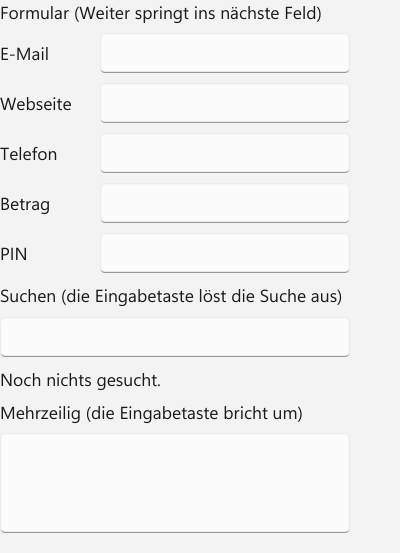
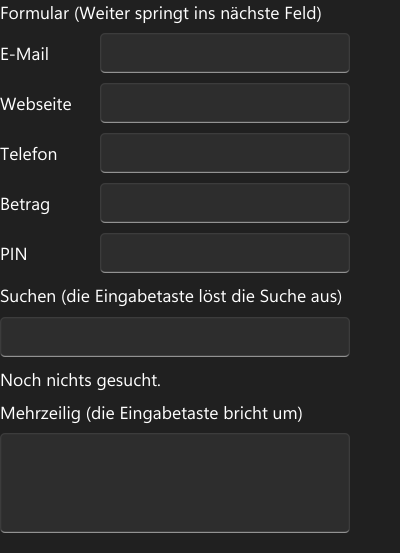
KXAML
BildschirmtastaturSeite.kxaml
<StackPanel xmlns="https://ui.kuonen.org/kxaml"
            xmlns:x="https://ui.kuonen.org/kxaml/x"
            x:Class="Kuonen.UI.Galerie.Seiten.BildschirmtastaturVorfuehrung"
            Spacing="8">
  <TextBlock Text="Formular (Weiter springt ins nächste Feld)" FontWeight="SemiBold" />
  <StackPanel Orientation="Horizontal" Spacing="8">
    <TextBlock Text="E-Mail" Width="72" VerticalAlignment="Center" />
    <TextBox Tastatur="EMail" Eingabeaktion="Weiter" Width="200" />
  </StackPanel>
  <StackPanel Orientation="Horizontal" Spacing="8">
    <TextBlock Text="Webseite" Width="72" VerticalAlignment="Center" />
    <TextBox Tastatur="Url" Eingabeaktion="Weiter" Width="200" />
  </StackPanel>
  <StackPanel Orientation="Horizontal" Spacing="8">
    <TextBlock Text="Telefon" Width="72" VerticalAlignment="Center" />
    <TextBox Tastatur="Telefon" Eingabeaktion="Weiter" Width="200" />
  </StackPanel>
  <StackPanel Orientation="Horizontal" Spacing="8">
    <TextBlock Text="Betrag" Width="72" VerticalAlignment="Center" />
    <TextBox Tastatur="Dezimalzahl" Eingabeaktion="Weiter" Width="200" />
  </StackPanel>
  <StackPanel Orientation="Horizontal" Spacing="8">
    <TextBlock Text="PIN" Width="72" VerticalAlignment="Center" />
    <PasswordBox Tastatur="Ziffern" Eingabeaktion="Fertig" Width="200" />
  </StackPanel>
  <TextBlock Text="Suchen (die Eingabetaste löst die Suche aus)" FontWeight="SemiBold" />
  <TextBox x:Name="Suche" Tastatur="Suche" Width="280" HorizontalAlignment="Left" EingabeaktionAusgeloest="Suche_EingabeaktionAusgeloest" />
  <TextBlock x:Name="Gesucht" Text="Noch nichts gesucht." />
  <TextBlock Text="Mehrzeilig (die Eingabetaste bricht um)" FontWeight="SemiBold" />
  <TextBox AcceptsReturn="True" Height="80" Width="280" HorizontalAlignment="Left" />
</StackPanel>
BildschirmtastaturSeite.kxaml.cs
using Kuonen.UI;
using Kuonen.UI.Controls;

namespace Kuonen.UI.Galerie.Seiten;

public sealed partial class BildschirmtastaturSeite
{
    protected override Func<UIElement>? KxamlFabrik => () => new BildschirmtastaturVorfuehrung();
}

/// <summary>KXAML-Fassung der Bildschirmtastatur-Seite: der Baum steht in BildschirmtastaturSeite.kxaml, hier nur das Verhalten.</summary>
public sealed partial class BildschirmtastaturVorfuehrung
{
    public BildschirmtastaturVorfuehrung() => InitializeComponent();

    private void Suche_EingabeaktionAusgeloest(object sender, EingabeaktionEventArgs e) => Gesucht.Text = "Gesucht: " + Suche.Text;
}
C#
BildschirmtastaturSeite.cs
using Kuonen.UI;
using Kuonen.UI.Controls;
using Kuonen.UI.Eingabe;
using Kuonen.UI.Layout;

namespace Kuonen.UI.Galerie.Seiten;

/// <summary>Galerie-Seite: Bildschirmtastatur (Tastaturart und Eingabetaste der Eingabefelder).</summary>
public sealed partial class BildschirmtastaturSeite : GalerieSeite
{
    public override string Titel => "Bildschirmtastatur";

    public override string Beschreibung =>
        "Auf Telefon, Tablet und im mobilen Browser bestimmt jedes Eingabefeld seine Bildschirmtastatur (Tastatur) und die "
        + "Eingabetaste (Eingabeaktion): Weiter springt ins nächste Feld, Fertig schliesst die Tastatur. Das Feld mit dem Fokus "
        + "bleibt über der Tastatur sichtbar. Am Desktop wirken nur Weiter und Fertig.";

    public override string Stichworte => "Tastatur Bildschirmtastatur Softkeyboard inputmode InputScope Eingabeaktion ReturnKey Weiter Fertig Mobil Telefon";

    public override string Datei => nameof(BildschirmtastaturSeite);

    public override UIElement Baue()
    {
        var gesucht = new TextBlock { Text = "Noch nichts gesucht." };
        var suche = new TextBox { Tastatur = Tastaturart.Suche, Width = 280, HorizontalAlignment = HorizontalAlignment.Left };
        suche.EingabeaktionAusgeloest += (_, _) => gesucht.Text = "Gesucht: " + suche.Text;

        var seite = new StackPanel { Spacing = 8 };
        seite.Children.Add(new TextBlock { Text = "Formular (Weiter springt ins nächste Feld)", FontWeight = 600 });
        seite.Children.Add(Feld("E-Mail", new TextBox { Tastatur = Tastaturart.EMail, Eingabeaktion = Eingabeaktion.Weiter }));
        seite.Children.Add(Feld("Webseite", new TextBox { Tastatur = Tastaturart.Url, Eingabeaktion = Eingabeaktion.Weiter }));
        seite.Children.Add(Feld("Telefon", new TextBox { Tastatur = Tastaturart.Telefon, Eingabeaktion = Eingabeaktion.Weiter }));
        seite.Children.Add(Feld("Betrag", new TextBox { Tastatur = Tastaturart.Dezimalzahl, Eingabeaktion = Eingabeaktion.Weiter }));
        seite.Children.Add(Feld("PIN", new PasswordBox { Tastatur = Tastaturart.Ziffern, Eingabeaktion = Eingabeaktion.Fertig }));
        seite.Children.Add(new TextBlock { Text = "Suchen (die Eingabetaste löst die Suche aus)", FontWeight = 600 });
        seite.Children.Add(suche);
        seite.Children.Add(gesucht);
        seite.Children.Add(new TextBlock { Text = "Mehrzeilig (die Eingabetaste bricht um)", FontWeight = 600 });
        seite.Children.Add(new TextBox { AcceptsReturn = true, Height = 80, Width = 280, HorizontalAlignment = HorizontalAlignment.Left });
        return seite;
    }

    private static StackPanel Feld(string beschriftung, TextBoxBase feld)
    {
        feld.Width = 200;
        var reihe = new StackPanel { Orientation = Orientation.Horizontal, Spacing = 8 };
        reihe.Children.Add(new TextBlock { Text = beschriftung, Width = 72, VerticalAlignment = VerticalAlignment.Center });
        reihe.Children.Add(feld);
        return reihe;
    }
}